

 Español
 Português
 中文 (中国)
 العربية
 हिन्दी
 Русский
 Français
 Deutsch
 Ελληνικά
 Italiano
 日本語
日本語 한국어
한국어 Latine
Summary
This lesson explains what LaTeX is and why the academic world uses it. It starts from typesetting, the craft of arranging every letter, every line and every page, and from the particular demands of academic texts; it compares the markup language and the word processor fairly; it tells why Donald Knuth created TeX and how Leslie Lamport built LaTeX on top of it, with the principle of separating content from form; it distinguishes the three engines used for compiling today, pdfLaTeX, XeLaTeX and LuaLaTeX, and justifies the choice of LuaLaTeX in this course; it shows what a source file looks like and how it becomes a PDF document; it surveys its use across the disciplines, from mathematics and physics to philosophy and philology; and it ends with its limits, so as to know when a word processor is enough.
Learning objectives
- Explain what typesetting is and why academic texts demand it to a greater degree than others.
- Compare the markup language with the word processor, pointing out the advantages and the costs of each.
- Distinguish TeX from LaTeX and explain, with an example, what separating content from form means.
- Choose the right engine for a document according to its languages, its scripts and its typefaces.
- Predict what a short source produces, paying attention to spaces, paragraphs and comments.
Typesetting
Every text printed or read on a screen has been typeset: someone, or something, has decided the exact place where each letter falls. Typesetting is the sum of those decisions: which typeface and which size are used, where each line ends and how the space between its words is distributed to justify it, which words are hyphenated and where, when two letters merge into a ligature, how the distance between certain pairs of letters is adjusted (kerning), where each page breaks, at what height the notes go and how the headings are arranged. For centuries it was the trade of the compositor, who set the lines with metal type; today a program carries it out, but the decisions remain the same.
A good paragraph goes unnoticed: the eye runs along the lines without stumbling over uneven gaps or absurd hyphenations. Achieving this is not trivial, however, because each decision constrains the following ones: the place where the first line ends determines the word with which the second begins, and so on to the end of the paragraph.
A simple method fills each line with as many words as fit and moves on to the next, never looking back. If a long word does not fit at the end of the third line, that line is left with wide spaces between its words, although moving one short word from the second line would have been enough to avoid it. The method that Knuth and Michael Plass designed for TeX works differently: it considers all the possible breaks of the paragraph at once and chooses the combination that distributes the spaces best over the whole. It follows that a line may end up slightly less full than it could have been, if the following lines improve thereby.
Academic texts demand this care to a greater degree than others. They contain formulas, whose typesetting obeys its own rules (the space around an equals sign is not the space around a comma, and a subscript is reduced by a fixed proportion); they refer to themselves constantly, with numbered sections, theorems, figures and equations that are cited by their number; they accumulate footnotes and bibliographic references that must follow a uniform style; they often mix several languages and several scripts; and they tend to be long, so that a slip repeated over a hundred pages cannot be corrected by hand. If this is so, it is wise to entrust the typesetting to a system that handles it with explicit rules and lets the author attend to what is being said.
Markup and the word processor
There are two ways of asking a program to typeset a text. In a word processor, such as Microsoft Word or LibreOffice Writer, the author sees on the screen the page as it will be printed, and modifies it directly: selects a word and puts it in italics, drags a margin, chooses a larger size for a heading. This mode is usually described by the phrase what you see is what you get.
In a markup language, by contrast, the author writes a plain text file in which marks are interspersed that say what each thing is or how it should be treated: that this word is emphasized, that this line is the heading of a section, that this passage is a quotation. A program then reads that file and produces the typeset document. Web pages are written this way, in HTML; LaTeX is a markup language designed to produce high-quality printed documents.
To be fair, the comparison must acknowledge what each mode does best. The word processor offers an immediate response, requires almost no prior learning, is the tool known to most of the people one collaborates with, and its tracked changes are the usual means of revision in many publishing houses and offices. The markup language offers, for its part, plain text files that any program will be able to open forty years from now, that take up little space and whose versions can be compared line by line; an explicit structure, from which the tables of contents, the numbering and the cross-references follow by themselves; a uniformity that does not depend on the author's discipline; and a typesetting of formulas and paragraphs that word processors do not attain. Its cost is equally clear: the marks have to be learned, the result is not seen until compiling, and a typing error can stop the compilation.
TeX and LaTeX
Donald Knuth and TeX
Donald Knuth, professor of computer science at Stanford University, had been publishing the volumes of The Art of Computer Programming since 1968. Around 1977, on receiving the proofs of a new edition of the second volume, set with the photographic technique that had replaced metal type, he judged them far inferior to those of the first edition, above all in the formulas. Instead of resigning himself to it, he decided to write a typesetting program himself, one that would restore to mathematics books the quality of the best traditional typography, and whose output would be identical on any computer. The first version of TeX appeared in 1978; Knuth rewrote it completely at the beginning of the following decade and also designed the METAFONT program, with which he drew the Computer Modern typefaces.
The name comes from Greek: its letters are the capitals tau, epsilon and chi, the beginning of the word τέχνη, which means both art and technique, and that is why the last letter is not pronounced like an x. Knuth has declared TeX finished and admits only bug fixes to it: since version 3, the version number approaches π, and each fix adds one more digit to it. This stability is one of its virtues, because a document written decades ago compiles today with the same result.
TeX, however, is a low-level language: its primitive instructions speak of boxes, of stretchable spaces and of penalties for breaking a line at one place or another. For an author who only wants to write an article, programming every heading and every note in those terms would be a disproportionate burden. TeX therefore allows the definition of macros, new instructions that expand into more elementary ones, and almost all of its real use goes through collections of macros.
Leslie Lamport and LaTeX: content separated from form
In the early 1980s, Leslie Lamport, a computer scientist known above all for his work on distributed systems, wrote on top of TeX a collection of macros that he called LaTeX, whose first version circulated in 1984; in 1986 he published the manual LaTeX: A Document Preparation System. Since 1994, the current version, called LaTeX2e, has been maintained by a team of volunteers, the LaTeX Project.
The central idea of LaTeX is that the author marks the content and not the form. One does not write “this line in bold and in a larger size”, but “this is the heading of a section”, with \section{Results}; one does not write “this word in italics”, but “this word is emphasized”, with \emph{hypothesis}. What a section heading looks like, whether it carries a number and how far it stands from the text, is decided by the document class, declared at the beginning, and by the instructions the author adds in the preamble. It follows that the appearance of the whole document is changed in a single place, and that the same text can be typeset according to the rules of two different journals without touching a line of the body.
In the following source there is no indication of size, typeface or number: it only says what each line is. The numbering of the section and the subsection, the size and weight of their headings and the italics of the emphasized word are decided by the document class.
\section{Results}The data confirm the initial \emph{hypothesis}.\subsection{The sample}The sample comprises twelve texts by three authors.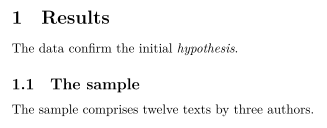
If a section is later inserted before this one, its number changes by itself from one to two, and the same happens with the subsection and with every reference that cites them.
The engines: pdfLaTeX, XeLaTeX and LuaLaTeX
LaTeX is a set of macros, not a program: it needs an engine, a program of the TeX family that executes them and produces the document. Three are in use today, and all three understand the same LaTeX; they differ in how they read the text and in which typefaces they can use.
- pdfLaTeX uses the pdfTeX engine, which Hàn Thế Thành developed to produce a PDF file directly. It is fast and very widespread, and it is the default engine of Overleaf. Its typefaces, however, are those of the classic TeX format, with at most 256 characters each, so it does not load the typefaces installed on the system directly, and writing Greek, Cyrillic or other scripts requires special encodings and packages; without them, a Greek letter stops the compilation with an error.
- XeLaTeX uses the XeTeX engine, created by Jonathan Kew, which reads the text in Unicode, the standard that assigns a number to every character of every script, and loads any OpenType typeface of the system through the fontspec package.
- LuaLaTeX uses the LuaTeX engine, which offers the same as XeTeX as regards Unicode and typefaces, and incorporates in addition the Lua programming language, with which packages can intervene in the typesetting. Current distributions run it with the HarfBuzz library built in, which shapes the scripts that join or combine their letters, such as Arabic or Devanagari.
This course uses LuaLaTeX. The reasons follow from the above: it writes directly in Unicode, so that a quotation from Plato in polytonic Greek, with its accents and breathings, is typed as it is; it uses the system's typefaces, including those required by a university or a journal; it typesets Latin, Greek and English in a single document, each with its own hyphenation rules; and it supports, with the appropriate packages, scripts that run from right to left, such as Arabic, or that do not separate their words with spaces, such as Chinese and Japanese. Therefore a single engine serves for all the documents of a course addressed at once to the sciences and to the humanities. Its only cost compared with pdfLaTeX is a somewhat slower compilation, which in documents of ordinary size is barely noticeable.
The following source loads fontspec, chooses a typeface that contains Greek letters and declares, through babel, English as the main language and Ancient Greek and Latin as secondary languages. The Greek words are written directly with their characters.
\documentclass{article}\usepackage{fontspec}\usepackage[latin, english]{babel}\babelprovide[import]{ancientgreek}\setmainfont{Linux Libertine O}\begin{document}Aristotle opens the \emph{Metaphysics} with this sentence:\foreignlanguage{ancientgreek}{πάντες ἄνθρωποι τοῦ εἰδέναι ὀρέγονται φύσει.}The Latin tradition handed it down thus:\foreignlanguage{latin}{omnes homines natura scire desiderant.}\end{document}
Marking a passage with \foreignlanguage does not change the appearance of the letters: it indicates what language the passage is in, so that its hyphenation rules and its conventions apply. With pdfLaTeX, this same source would not compile: fontspec requires XeLaTeX or LuaLaTeX.
The source file, compilation and the PDF
A LaTeX document is a plain text file with the extension .tex. It consists of two parts. The preamble runs from the first line, \documentclass{article}, which declares the document class, to \begin{document}; in it the packages are loaded, with \usepackage, and the decisions of form are fixed. The body runs from \begin{document} to \end{document} and contains the text. Instructions begin with a backslash, and what they receive is written between braces.
This source is a complete document: it compiles without adding anything to it, and it will be the starting point of the documents of the course.
\documentclass{article}\usepackage{fontspec}\usepackage[english]{babel}\begin{document}\section{Introduction}Typesetting decides where each letter falls.\end{document}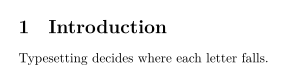
The section receives the number one without its having been written, and its heading uses the typeface and the size set by the article class.
The working cycle has three moments: the source is written, it is compiled and the result is read. Compiling is running the engine on the file, in this course the command lualatex, which reads the source and writes a PDF file with the same name. Next to it remain auxiliary files, among them one with the extension .log, the log, where the engine records errors and warnings, and another with the extension .aux, where it stores the numbers of the sections and the pages. That is why a table of contents or a cross-reference only appears correctly after a second compilation: in the first, the engine notes where each thing ended up; in the second, it uses that information. In practice the command is not typed by hand: the editor runs it with a button. In this course the work is done with Texmaker, on one's own computer, or with Overleaf, in the browser; the next lesson prepares that environment.
The source is not typeset as it is written, and three rules explain almost all the initial surprises. First, several consecutive spaces count the same as one, and a line break counts as a space: the engine distributes the space on its own, and the space the author writes only indicates that a word ends there. Second, one or more blank lines end the paragraph and begin another. Third, the sign % starts a comment: the engine ignores everything that follows up to the end of the line, including the line break itself.
The following source is written carelessly on purpose. The result has two paragraphs with uniform spaces, and the note that follows the comment sign does not appear.
Repeated spaces are reduced to one, and this line breakis also a space.A blank line opens a new paragraph. % This note is not printed.
If this is so, to print the percent sign it is not enough to write it: it has to be written preceded by a backslash, like this: \%. The same happens with the other characters that LaTeX reserves for its own functions, such as braces or the dollar sign.
LaTeX in the academic disciplines
In mathematics, in physics and in a good part of computer science, LaTeX is the norm: journals offer their own document classes so that authors can submit their articles in the journal's format, and arXiv, the repository where the papers of those disciplines circulate before publication, accepts LaTeX sources and compiles them itself. The reason is the typesetting of formulas, which no other system matches with so little effort, and the automatic numbering of theorems and equations. Economics, statistics, engineering and chemistry also use it to a large extent.
It would be a mistake, however, to believe that LaTeX is the exclusive concern of the exact sciences. In philosophy, in classical philology and in history, its virtues are different, and no lesser. Critical editions, which accompany an ancient text with an apparatus that records the variants of the manuscripts in notes keyed to line numbers, have specialized LaTeX packages, such as reledmac, which number the lines, arrange several levels of notes and keep their references when the text changes. Polytonic Greek and Latin are written and hyphenated correctly, as we have seen. Footnotes, which in a humanities essay may run into the hundreds, are numbered and placed on their page by themselves. And the bibliography, with BibLaTeX, is written only once as a database and cited in whatever style is requested, be it the author-date style of the social sciences, the numeric style of the sciences or the footnote style of the humanities, by changing a single option.
The limits of LaTeX
LaTeX, however, has real costs, and it is wise to know them before adopting it. Its learning curve is steep: the first weeks require frequent looking up of how to do what in a word processor is done with a click. Its error messages, inherited from TeX, are often cryptic and sometimes point to a line later than the one containing the error; an upcoming lesson of this unit teaches how to read them. The composition of freely designed pages, such as a poster or an illustrated magazine, in which each element is placed by hand, is more laborious than in a page layout program. And not every recipient accepts it: quite a few humanities journals, publishers and offices require a word processor file, and revise with its tracked changes.
From which a simple criterion follows. A short letter, minutes, a form or a text that another person will revise in a word processor is better written in a word processor. A long document, with structure, formulas, citations, notes, several languages or a long life ahead of it, which will have to be corrected and republished for years, is better written in LaTeX.
Solved problems
The following problems do not ask you to recall what has been said, but to apply it: the first requires predicting exactly what a source produces, the second, deciding which engine and which typefaces a document requires, and the third, separating content from form in a source written without that care.
Without compiling it, predict exactly the text that the following body produces, how many paragraphs it has and what happens with each percent sign.
Typesetting decides where each letter falls.A good paragraph goes unnoticed.Fully 50 % of readersnever notice the difference. This wo%rd stays whole.Solution
The first three lines have no blank line between them: they form a single paragraph. The repeated spaces and those at the beginning of the second line are reduced to one, and each line break counts as a space. The first paragraph reads: “Typesetting decides where each letter falls. A good paragraph goes unnoticed.”
Two blank lines follow. One is enough to end a paragraph, and a second adds nothing: there is no empty paragraph and no larger space. The second paragraph therefore begins.
In the line
Fully 50 % of readers, the percent sign is not printed: it starts a comment. The engine discards “of readers” and also the line break; only the space written before the sign remains, and the next line continues from it.In “wo”, the percent sign is attached to the word: it discards the line break without leaving any space, and the engine skips the spaces at the beginning of the next line. It follows that “wo” and “rd” are joined into a single word.
The second paragraph reads: “Fully 50 never notice the difference. This word stays whole.” The author wanted to write a percentage and lost half a sentence without the engine reporting any error; to print the sign,
\%had to be written.
A philosophy student is writing a thesis in English on the Phaedo. She quotes passages of Plato in polytonic Greek and passages of Latin commentators, and her university requires a particular typeface, installed on her computer as an OpenType file, which contains no Greek letters. Decide which engine she needs and what else she must declare for the document to come out complete.
Solution
pdfLaTeX is ruled out for two independent reasons: it does not load the system's OpenType typefaces directly, and a Greek letter written in Unicode stops its compilation unless special encodings and typefaces are prepared. The first is enough to exclude it, because the institutional typeface is mandatory.
XeLaTeX and LuaLaTeX read Unicode and load the system's typefaces with fontspec: with either of them, the institutional typeface is declared in the preamble by means of
\setmainfont. The course uses LuaLaTeX.The engine, however, is not enough. If the typeface contains no Greek letters, LuaLaTeX compiles without error, but the Greek words do not appear in the PDF: the engine only records it in the log, with warnings of the type
Missing character. The problem does not show in the compilation, but when reading the result.Therefore Greek must be assigned a second typeface that contains it. With babel, Ancient Greek is declared as a language with
\babelprovide[import]{ancientgreek}and assigned its typeface with\babelfont[ancientgreek]{rm}{GFS Didot}; each Greek passage is marked with\foreignlanguage.Latin is written in the Latin alphabet, which the institutional typeface contains; it needs no other typeface, only to be declared as a language, with babel's
latinoption, so that its words are hyphenated according to the rules of Latin and not those of English.In sum: LuaLaTeX, the institutional typeface as the main one, a typeface with polytonic Greek for the Greek passages, and English, Ancient Greek and Latin declared as languages.
An author wrote the beginning of the second section of an article like this. Point out which marks express form instead of content, rewrite them so that they only say what each thing is, and explain what is gained if the journal later asks for the Greek terms to appear without italics.
{\Large\bfseries 2. Results}\\[6pt]As Aristotle states in the \textit{Metaphysics}, the desireto know is \textit{natural}; the Greek term is \textit{φύσει}.\\\vspace{12pt}{\large\bfseries 2.1. The sample}\\Solution
The first line fixes by hand the size, the weight, the number and the spacing of what is, in reality, the heading of a section. It is replaced by
\section{Results}, and the number is supplied by the class; written by hand, it would be out of step as soon as an earlier section was inserted.In that source,
\textitappears three times, with three different functions: it marks the title of a work, an emphasized word and a Greek term. That all three are printed in italics today is a coincidence of form, not an identity of content.Each function receives its own mark. For the emphasized word there is
\emph{natural}; for the other two, new instructions are defined in the preamble, for example\newcommand{\work}[1]{\textit{#1}}and another analogous one,\term, which are used in the body as\work{Metaphysics}and\term{φύσει}.The double backslashes, which force a line break, and the vertical space added by hand imitate the separation between paragraphs. They are removed: a blank line ends the paragraph, and the class decides the spacing. The heading of the subsection is written
\subsection{The sample}.If the journal asks for the Greek terms without italics, it is enough to change one line of the preamble, the one that defines
\term, and the change reaches all the terms of the article, without touching the titles of works or the emphasized words. With the original source, every italic would have to be reviewed one by one, deciding in each case which function it corresponded to.
Online exercises
In these exercises you write the code in the box and the browser checks it instantly: it checks the braces, the environments and what each exercise asks for, without compiling it. Once the check is passed, it is worth copying the code into Texmaker and compiling it, because only the compiled result shows what is really printed.
The box contains only the text of a document written in Spanish; the checker looks for that very text, so keep it as it is. Complete it until it is a whole document that compiles with LuaLaTeX: the article class, the fontspec and babel packages with Spanish, the language of the text, and the beginning and end of the body. The text does not change.
Your browser checks your code instantly, without compiling or grading it. To see the real output, compile it in Texmaker.
Hint
A document consists of two parts: the preamble, which begins with the class and loads the packages, and the body, which contains the text.
Show solution
\documentclass{article}\usepackage{fontspec}\usepackage[spanish]{babel}\begin{document}\section{Introducción}La composición tipográfica decide dónde cae cada letra.\end{document}The following fragment, taken from an article in Spanish, says how each line should look, and not what it is. Rewrite it so that it marks the content: the first heading is a section and the second a subsection, both numbered by the class, and “qué es” (“what it is”) is an emphasized expression. The text does not change (the checker looks for the Spanish words), and the forced line breaks disappear.
Your browser checks your code instantly, without compiling or grading it. To see the real output, compile it in Texmaker.
Hint
For each line, ask yourself what it is (a section heading, a subsection heading, an emphasized expression) and look for the instruction that says so; everything else is decided by the class.
Show solution
\section{Marcado y procesador de textos}En un lenguaje de marcado, el autor dice \emph{qué es} cada cosa.\subsection{El procesador de textos}El autor ve la página tal como se imprimirá.Proposed problems
Each problem has a hint, which is best opened only after having tried it, and an answer, which appears after the hint has been opened.
Predict what text the following body produces, in which \LaTeX and \TeX are the instructions that print the logos of LaTeX and TeX. Explain the difference between the two lines and propose a correction for the first.
I have been writing with \LaTeX for a year.I use \LaTeX{} and \TeX\ every day.Hint
Ask yourself where the name of an instruction made of letters ends, and what the engine does with the space that follows it: is it part of the text or of the instruction?
Answer
A single paragraph: “I have been writing with LaTeXfor a year. I use LaTeX and TeX every day.” The name of the instruction ends at the first character that is not a letter, and the spaces that follow it are absorbed in reading it; in the second line, the empty braces and the backslash followed by a space close the instruction and keep the space. The first line is corrected with \LaTeX{} for or with a backslash followed by a space.
For each of the following documents, decide with which engines it can be compiled without special preparations and justify the decision: a mathematics thesis in English, typeset with the default LaTeX typeface; the edition of a Greek treatise with notes in Latin, which must use an OpenType typeface installed on the system; and an article in English that quotes sources in Arabic and in Hindi. Then explain why the course adopts a single engine for all of them.
Hint
For each document, ask yourself two things: whether it needs a system typeface, and whether it contains scripts other than the Latin alphabet that must be read in Unicode and, in some cases, join or combine their letters.
Answer
The mathematics thesis admits all three engines. The Greek edition requires XeLaTeX or LuaLaTeX, because of the system typeface and because of Greek in Unicode. The article with Arabic and Hindi also requires XeLaTeX or LuaLaTeX, because of Unicode, because of the letters that join and combine and, in Arabic, because of the right-to-left script. LuaLaTeX serves for all three, and with a single engine all the sources of the course are compiled in the same way.
Decide, for each case, whether LaTeX or a word processor is preferable, and justify the decision with a criterion other than habit: a two-page letter addressed to an office; a two-hundred-page thesis with formulas, numbered figures and one hundred and fifty references; an article for a history journal that only accepts word processor files and revises with tracked changes; and a set of lecture notes with Greek quotations, which their author will expand over several years.
Hint
Consider, in each case, the length and the structure of the document, how long it will live and who else will have to read or modify its file, and not only the printed result.
Answer
The letter, in a word processor: it is short, without structure and without a later life. The thesis, in LaTeX: its length, its formulas and its cross-references benefit from automatic numbering and from the bibliography as a database. The article, in a word processor, because the recipient imposes it. The notes, in LaTeX: their long life, their growing structure and the Greek favor plain text and Unicode.
Completed
Sign in to save your progress