

 Español
 Português
 中文 (中国)
 العربية
 हिन्दी
 Русский
 Français
 Deutsch
 Ελληνικά
 Italiano
 日本語
日本語 한국어
한국어 Latine
Summary
This lesson teaches how to enter mathematical mode and leave it with judgement. It explains what changes in that mode with respect to text: letters are set in italic as variables, spaces in the source do not count and the engine computes the spacing of each sign according to its class, blank lines are forbidden, and some signs exist in only one of the two modes; it shows why a variable is not written with \textit and what happens in LuaLaTeX to a mathematical symbol written outside its mode. It presents inline formulas, with $…$ and \(…\), their limited height, line breaks inside them, the tie and punctuation; displayed formulas, with \[…\] and the environments equation and equation*, as parts of the sentence that are punctuated, and the reasons not to use $$…$$ nor to leave a blank line before them; numbering, with \label, \eqref, \numberwithin and \tag; text inside a formula, with \text and \mathrm, and explicit spaces; the decimal point and the comma in mathematical mode, and the siunitx package for numbers and units. It ends with the typical errors, as the log writes them, and with what is best avoided.
Learning objectives
- Explain what changes in mathematical mode with respect to text, and predict the result of a variable, a word or a symbol written in the wrong mode.
- Choose between an inline formula and a displayed formula, and write each one as part of the sentence, with its punctuation and without improper blank lines.
- Number displayed formulas with
equation, refer to them with\eqref, and predict the numbering produced by\numberwithinand\tag. - Write decimal numbers and quantities with units according to English usage, knowing what the comma does in mathematical mode.
- Diagnose from the log the errors “
Missing $ inserted”, “Bad math environment delimiter” and “Missing character”, and locate their cause in the source.
Two modes of typesetting
So far the engine has typeset text: words separated by spaces, distributed into lines and paragraphs. A formula obeys other rules, and that is why LaTeX typesets it in a distinct mathematical mode, which is entered and left by means of delimiters. A great deal changes on entering it, and it is worth listing before looking at the delimiters, because almost all the advice in this lesson follows from it.
- Letters are set in an italic of their own, that of variables, with a width and a spacing designed to be read as symbols and not as words.
- Spaces in the source do not count:
$x=a-b$and$x = a - b$produce exactly the same thing. The spacing is computed by the engine according to the class of each sign: ordinary (a letter, a digit), binary operator (+,-), relation (=,<), punctuation (the comma), opening and closing (parentheses). - A blank line is not allowed: a blank line ends the paragraph, and a formula cannot be left open when a paragraph ends.
- Some signs exist in only one of the two modes:
^and_, which form superscripts and subscripts, or Greek letters such as\alpha, are mathematical; accented letters, such as é, are text.
As text: x=a-b, y=-b.In mathematical mode: $x=a-b$, $y=-b$.With other spaces in the source: $x = a- b$, $y = - b$.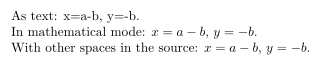
The second and third lines are identical, although their sources differ. In $x=a-b$ the minus sign is binary, because it has an operand on each side, and it receives a medium space; after the equals sign of $y=-b$ it has none on its left, so it is treated as a sign of a single operand and sticks to the b. The first line, set as text, distinguishes nothing: the hyphen is a hyphen and the equals sign has no spaces.
Why a variable is not written with textit
It follows from the above that the italic of text and the italic of mathematical mode are not the same thing. \textit{x} produces a letter of the text italic, without the spacing that the engine gives to signs; and a word written in mathematical mode is not a word, but a sequence of multiplied variables, each with its own spacing.
With textit: \textit{f}(\textit{x}) = \textit{x} + 1, if \textit{x} > 0.As a formula: $f(x) = x + 1$, if $x > 0$.A word in mathematical mode: $cost = price - discount$.The words as text: $\text{cost} = \text{price} - \text{discount}$.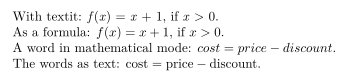
In the first line the only spaces are the word spaces the author typed, and the signs are those of the text font; the letters, moreover, are those of the text italic, which differ in shape from those of the formula. Inside the formula, by contrast, the engine gives the equals sign and the greater-than sign the space of a relation on each side. In the third line, “cost” reads as the product of four variables, with the letters irregularly spaced. The command \text, from the amsmath package, is studied later in this lesson.
A mathematical symbol outside its mode
With pdfLaTeX, writing \alpha in the text produces the error “Missing $ inserted”. With LuaLaTeX, the engine of this course, it does not: the Greek letter is typeset without error, but unpredictably. If no formula has yet been typeset in the document, it disappears; if one has, it appears, taken from the mathematical font and stuck to the following word, because the space that follows a command is lost.
First: the angle \alpha is acute.Second: the angle $\alpha$ is acute.Third: the angle \alpha is acute.
The first sentence loses the letter without any visible warning; the third keeps it by chance, stuck to “is”. The only trace is in the log, and only of the first:
Missing character: There is no ^^K (U+000B) in font nullfont!Therefore, in LuaLaTeX a mathematical symbol written outside its mode is not reported: it must always be written between delimiters, and it is wise to search the log for “Missing character” before considering a document finished.
Loading the content…
Completed
Sign in to save your progress